

Co-author: Swarnima Singh student at CHRIST (Deemed to be University), Bengaluru]
Introduction:
"Being a victim of such a deplorable act not only dents the esteemof a woman but also takes a toll on her emotional, mental, and physical health."1
Sexual harassment at the workplace is a direct violation of a woman's right to work in a safe and dignified environment. To address this, the Indian Parliament enacted the Sexual Harassment of Women at Workplace (Prevention, Prohibition and Redressal) Act, 2013 ("POSH Act").2 This Act places a statutory obligation on employers to prevent harassment against women, provide effective redressal mechanisms, and ensure compliance through structured internal processes.
However, a law is only as strong as its implementation. In the landmark case of Aureliano Fernandes v. State of Goa & Ors.,3 the Apex Court held that there was an immediate need to eliminate the lacuna between law on paper and justice on the ground. The Court emphasised that institutional mechanisms and framework must be reinforced to assert accountability through transparency, accessibility and digitalisation.
In response to the aforementioned ease of access and transparency, the Ministry of Women and Child Development developed the SHe-Box (Sexual Harassment Electronic Box)4. This centralised hub helps monitor the complaints as well as exercise control over each organisation, whether private or government. Furthermore, the portal also enables the company to incorporate the stipulations of the POSH Act into a digital platform, ensuring that, after a complaint is filed, it is automatically sent to the relevant Internal Committee (IC). This eliminates bureaucratic delays, masks the complainant's identity to maintain confidentiality, and allows for real-time tracking of the inquiry process to ensure it is completed within the statutory 90-day timeline.
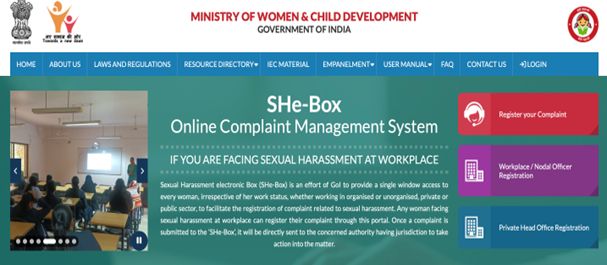
A glance at the SHe-Box homepage itself speaks of the magnitude of the compliance structure. The portal currently documents over 54,000 privately registered entities and over 22,000 state-registered entities in the country, with 777 constituted Local Committees, since its implementation in 2017.5 These are not just the statistical figures, as they raise an important compliance question:
"Where does an organisation stand if it remains outside this centrally monitored mechanism?"
Against this backdrop, to make sure that the standards of your workplace are in line with these national standards, it becomes essential to learn the way organisations can fill the registration form on SHe-Box portal. The following section sets out a clear, step-by-step guide to registering on SHe-Box, along with the documents required at each stage, to ensure compliance with the POSH Act, 2013.
Registration Process:6
Step 1: Access the SHe-Box Portal
- Open the web browser.
- Enter the official URL: https://shebox.wcd.gov.in/
- You will be redirected to the SHe-Box homepage.
Step 2: Private Head Office Registration
The registration process for private head offices on the SHe-Box portal is outlined below in a sequential manner.
- On the homepage, click on "Private Head Office Registration."
- A prompt will appear.
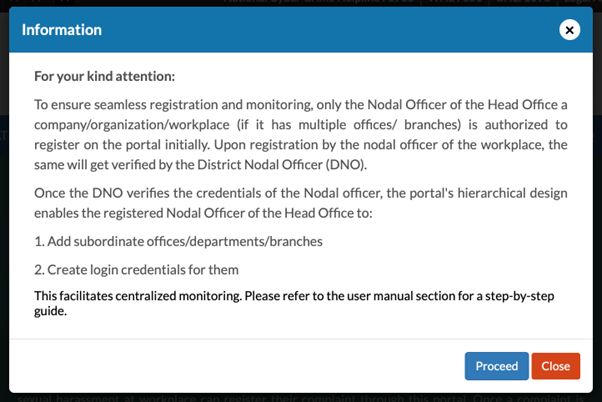
- Click "Proceed" to continue with registration.
Step 3: Fill in Head Office Organisation Details
You will now be required to provide basic organisational information:
- Name of Organisation / Office / Company:Enter the full legal name as per registration records.
- State, District & Sub-District:Select the State, District And Sub-district where head office is located.
- PIN Code:Enter the correct area's Postal Index Number (PIN)
- Complete Address:Provide the full registered address of the head office.
- STD Code & Landline Number (Optional):May be entered if available.
- Mobile Number:Enter the official contact number.
- Email ID:Enter the official organisational email address.
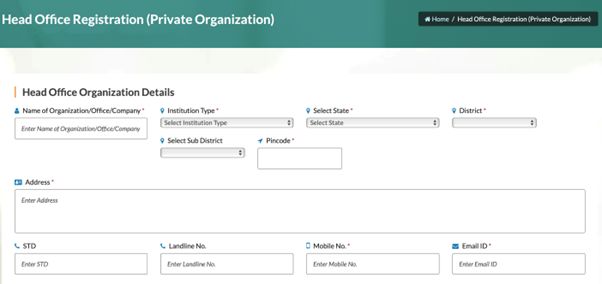
Ensure that all mandatory (*) fields are correctly filled before proceeding.
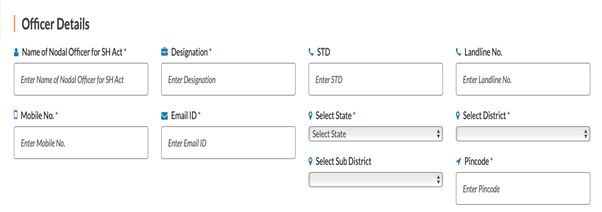
Step 4: Enter Nodal Officer Details
Appointment of a Nodal Officer by each organisation is a mandate, to ensure compliance with the provisions of the POSH Act, 2013, and SHe-Box monitoring.
Required details include:
- Name of Nodal Officer:Authorised person overseeing POSH compliance.
- Designation:For example: HR Manager, Compliance Officer, Legal Officer.
- Mobile Number & Email ID:The email ID will be used for login credentials, so accuracy is critical.
- STD Code & Landline Number (Optional)
- State, District & Sub-District:Usually the same as the head office.
- PIN Code & Address:Generally identical to the head office address.
Step 5: Upload Supporting Documents
You must upload at least one official document to verify the organisation.
- Company Registration Certificate
- GST Registration Certificate
- Company PAN Card
- Any other officially recognised proof
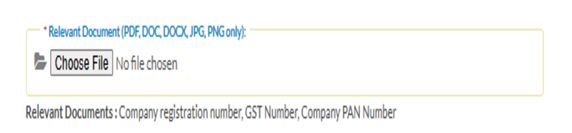
If you have multiple documents, merge them into a single file before uploading.
- File Requirements:
- Formats allowed:PDF, DOC, DOCX, JPG, PNG
- Only one file can be uploaded
Step 6: Enter Captcha and Submit the Form

Step 7: Verification by District Nodal Officer
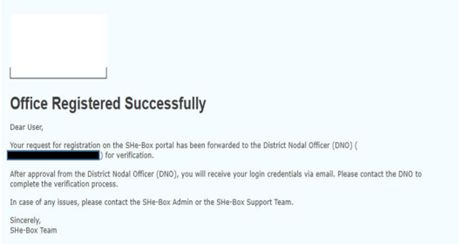
- After submission, your registration request is sent to District Nodal Officer (DNO) for verification.
- This process is conducted offline by authorities and may take some time. No action is required from the organisation during this stage.
Step 8: Approval and Receipt of Login Credentials
Once approved:
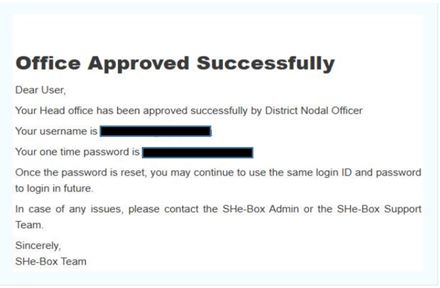
- The organisation shall receive an official email
containing:
- Username
- One-Time Password (OTP)
- On first login, the user must reset the password.
Post-Registration Compliance Steps (After Login)
Compliance under the POSH Act, 2013 continues through the dashboard upon registration.
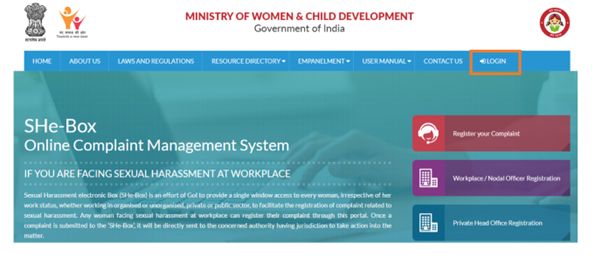
Step 9: Login as Head Office Nodal Officer
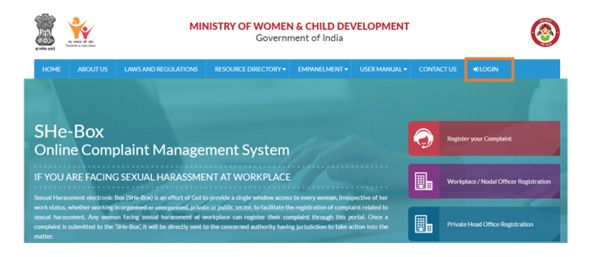
- Visit the SHe-Box portal.
- Click Login.
- Enter username, password, and captcha.
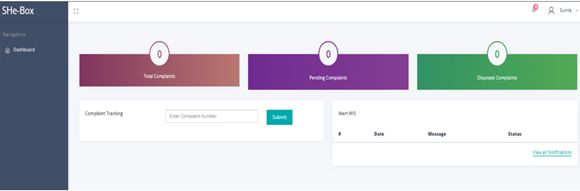
- Access the Private Head Office NO Dashboard.
Step 10: Register Internal Committee (IC)
- Go to Workplace & IC Management section.
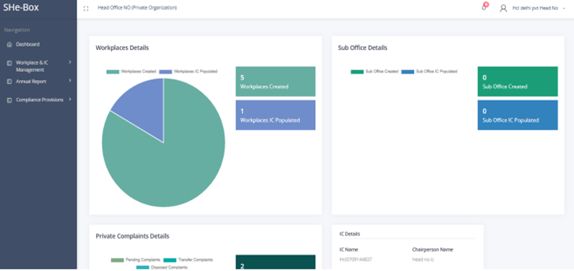
- Click on IC Registration.
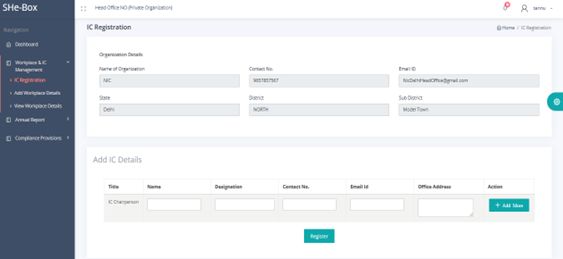
- Create the Chairperson's
- Click Add More to add IC members.
- Once all details are added, submit the register button.
After IC creation, the Chairperson receives login credentials via email.
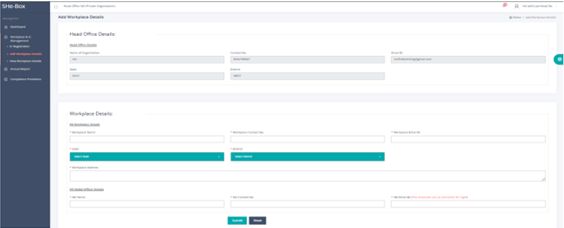
Step 11: Add Workplace / Branch Office Details
For private subordinate or branch offices:
- Go to Workplace & IC Management.
- Click Add Workplace Details.
- Enter required information.
- Click Submit.
Step 12: Submit Annual Report
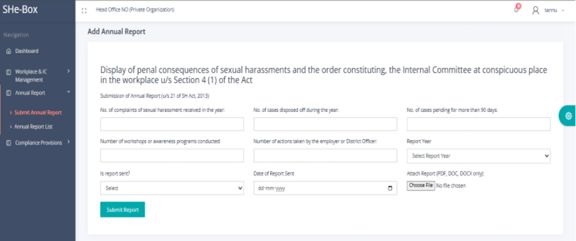
- Navigate to the Annual Report
- Click Submit Annual Report.
- Fill in the required details.
- Submit the report.
Step 13: Record Compliance & Awareness Activities
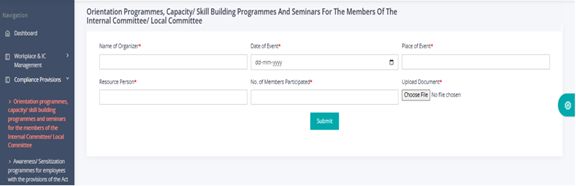
- Go to the Compliance Provisions section.
- Click on Orientation Programmes, Capacity Building and Skill training for the IC/LC member seminars.
- Furnish the details.
- Submit
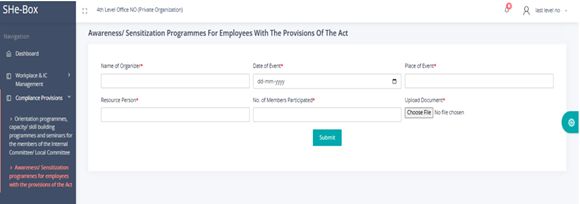
- Awareness Programmes:
- To view awareness programmes, click on Awareness/ Sensitisation programmes for employees under the POSH Act.
- Furnish the details
- Submit
Step 14: Complaint Handling & Timelines
- Complaints can be viewed by the IC Chairperson, upon LOGIN,
using his username and password (as specified under STEP
10)
- Mandatory resolution timeline: 90 days, as prescribed under the POSH Act, 2013.7
- Tracking and monitoring can be done through the dashboard.
Conclusion:
The implementation of the POSH Act, 2013, was a commendable legislative move towards protecting women in the workplace, but its success all depends on its consistent and uniform implementation. The SHe-Box portal fills this gap by converting statutory obligations into a well-organized technology-driven compliance system. The centralisation of redressing complaints, monitoring of Internal Committees and real-time supervision, enhances accountability of the employer without compromising on confidentiality, while ensuring procedural fairness. Thus, registration on SHe-Box is not some kind of formality but rather an extension of the legal obligation of the employer under the Act. At a time when the courts are becoming more concerned with institutional responsibility, being out of this system is physically costly in terms of compliance. Good use of SHe-Box is therefore a feasible compliance with the work practices with the goals of the POSH Act, 2013.
Footnotes
1. Aureliano Fernandes v. State of Goa, (2024) 1 SCC 632 (India).
2. Sexual Harassment of Women at Workplace (Prevention, Prohibition and Redressal) Act, No. 14 of 2013 (India).
3. Aureliano Fernandes v. State of Goa, (2024) 1 SCC 632 (India).
4. Press Info. Bureau, Gov't of India, Ministry of Women & Child Dev., SHe-Box Online Complaint Management System for Working Women to Lodge Complaints of Sexual Harassment at Workplace Launched (Nov. 7, 2017) (India).
5. Ministry of Women & Child Dev., Gov't of India, SHe-Box: Online Complaint Management System, https://shebox.wcd.gov.in.
6. Ministry of Women & Child Dev.,
Gov't of India, SHe-Box Private Head Office User Manual,
https://shebox.wcd.gov.in/assets/usermanual/Private-Head-Office-User-Manual.pdf.
7. Sexual Harassment of Women at Workplace (Prevention, Prohibition and Redressal) Act, No. 14 of 2013, § 11(4) (India).
The content of this article is intended to provide a general guide to the subject matter. Specialist advice should be sought about your specific circumstances.
